
 辅助触控
辅助触控
# 效果图
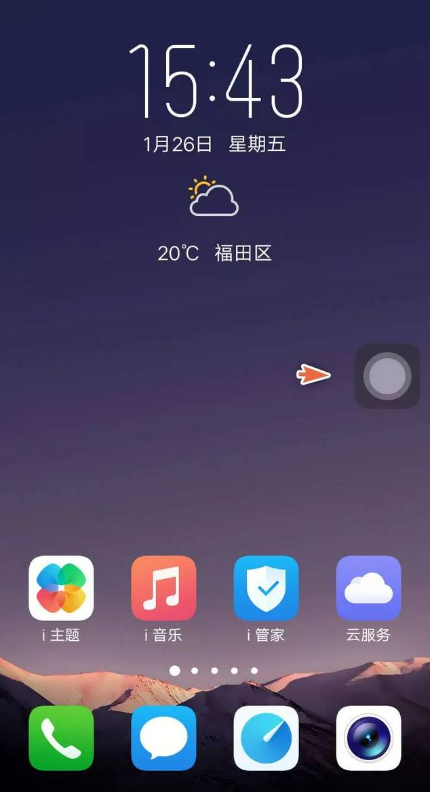
# 使用
<drag-button :isDock="true" :edge="10" :existTabBar="false" :tabBarHeight="40" :hasMenu="true" />
1
# 业务主代码
<template>
  <view>
    <view
      id="drag-button"
      class="drag"
      :style="{left: `${left}px`, top: `${top}px`, ...buttonStyle}"
      @touchstart="touchstart"
      @touchmove.stop.prevent="touchmove"
      @touchend.stop="touchend"
      @click.stop.prevent="click"
      :class="{ transition: isDock && !isMove, opacity: buttonOpacity }"
    >
      <text>{{ text }}</text>
      <transition name="fadeBox">
        <view v-if="showMenu" :class="['menu-container', menuLeftPosition, menuTopPosition]" >菜单</view>
      </transition>
    </view>
  </view>
</template>
<script>
/**
 * drag-button  辅助触控/拖拽组件
 * @description 可拖拽至页面任意边界位置
 * @property {Boolean}  isDock    左右边界阻拦
 * @property {Boolean}  existTabBar     底部是否存在tabBar
 * @property {Number}   tabBarHeight     底部tabBar的高度
 * @property {Number}   edge          静止时离边界的距离
 * @property {Object}   buttonStyle      拖拽按钮的样式
 * @property {Boolean}  hasMenu    是否有菜单

 * @event  event:btnTouchstart   手指开始触摸时触发
 * @event  event:btnTouchend     手指结束触摸时触发
 * @event  event:btnTouchstart   点击按钮时触发
 * @example    <drag-button :isDock="true" :edge="10" :existTabBar="false" :tabBarHeight="40" :hasMenu="true" />
 */
export default {
  name: 'drag-button',
  props: {
    isDock: {    // 左右边界阻拦
      type: Boolean,
      default: false
    },
    existTabBar: {   // 底部是否存在tabBar
      type: Boolean,
      default: false
    },
    edge: { // 静止时离边界的距离
      type: Number,
      default: 10
    },
    tabBarHeight: {  // 底部tabBar的高度
      type: Number,
      default: 10
    },
    buttonStyle: {   // 按钮的样式
      type: Object,
      default: () => {
        return {}
      }
    },
    hasMenu: {      // 是否有菜单
      type: Boolean,
      default: false
    }
  },
  data() {
    return {
      top: 0,
      left: 0,
      width: 0,
      height: 0,
      offsetWidth: 0,
      offsetHeight: 0,
      windowWidth: 0,
      windowHeight: 0,
      isMove: true,
      text: '悬浮球',
      menuLeftPosition: 'right',  // 动态控制菜单显示的左右位置
      menuTopPosition: '',   // 动态控制菜单显示的上下位置
      showMenu: false,     // 是否展示菜单
      buttonOpacity: false   // 悬浮球是否透明
    };
  },
  mounted() {
    const systemInfo = uni.getSystemInfoSync();   // 获取设备信息
    // 获取屏幕宽高
    this.windowWidth = systemInfo.windowWidth;
    this.windowHeight = systemInfo.windowHeight;

    this.existTabBar && (this.windowHeight -= this.tabBarHeight);   // 底部如果有tabBar,页面可操作高度就减去tabBar高度,避免被tabBar遮住
    if (systemInfo.windowTop) {   // 可使用窗口的顶部位置
      this.windowHeight += systemInfo.windowTop;
    }
    const query = uni.createSelectorQuery().in(this);
    query.select('#drag-button').boundingClientRect(data => {   // 添加节点的布局位置
      // 节点宽高
      this.width = data.width;
      this.height = data.height;
      this.offsetWidth = data.width / 2;
      this.offsetHeight = data.height;
      // this.offsetHeight = data.height / 2;
      this.left = this.windowWidth - this.width - this.edge;   // 初始时,离左边界的距离
      this.top = ((this.windowHeight - this.height - this.edge) * 3) / 4;  // 初始时,离上边界的距离
    })
    .exec();

    // 点击页面任意位置,隐藏菜单,显示悬浮球
    window.addEventListener('click', () => {
      this.showMenu = false;
      this.buttonOpacity = false;
    })
  },
  methods: {
    click() {
      if(this.hasMenu) {
        this.showMenu = true;
        this.buttonOpacity = this.showMenu ? true : false;
      } else {
        this.$emit('btnClick');    // 若没有菜单,点击后抛出事件
      }
    },
    touchstart(e) {
      this.$emit('btnTouchstart');
    },
    // 悬浮球移动事件
    touchmove(e) {
      // 单指触摸
      if (e.touches.length !== 1) {
        return false;
      }
      this.isMove = true;
      this.left = e.touches[0].clientX - this.offsetWidth;
      let clientY = e.touches[0].clientY - this.offsetHeight;
      clientY += this.height / 2;
      // clientY += this.height;
      let edgeBottom = this.windowHeight - this.height - this.edge;
      // 当上下触及边界时
      if (clientY < this.edge) {
        this.top = this.edge;
      } else if (clientY > edgeBottom) {
        this.top = edgeBottom;
      } else {
        this.top = clientY;
      }
      // 菜单位置跟随着按钮位置变动
      if(this.top < this.windowHeight / 2) {
        this.menuTopPosition = 'top';
      } else {
        this.menuTopPosition = 'bottom';
      }
    },
    touchend() {
      if (this.isDock) {
        let edgeRigth = this.windowWidth - this.width - this.edge;
        if (this.left < this.windowWidth / 2 - this.offsetWidth) {
          this.left = this.edge;
          this.menuLeftPosition = 'left';
        } else {
          this.left = edgeRigth;
          this.menuLeftPosition = 'right';
        }
      }
      this.isMove = false;
      this.$emit('btnTouchend');
    }
  }
};
</script>

<style lang="scss">
.drag {
  display: flex;
  justify-content: center;
  align-items: center;
  background-color: rgba(0, 0, 0, 0.5);
  box-shadow: 0 0 6rpx rgba(0, 0, 0, 0.4);
  color: #fff;
  width: 80rpx;
  height: 80rpx;
  border-radius: 50%;
  font-size: 24rpx;
  position: fixed;
  z-index: 99;
  &.opacity {
    background-color: rgba(0, 0, 0, 0);
    box-shadow: 0 0 6rpx rgba(0, 0, 0, 0);
    color: rgba(0, 0, 0, 0);
  }
  .menu-container {
    width: 500rpx;
    height: 500rpx;
    background-color: #27282c;
    color: #fff;
    padding: 30rpx;
    box-sizing: border-box;
    border-radius: 15rpx;
    font-size: 32rpx;
    position: absolute;
    &.fadeBox-enter{
      opacity: 0;
    }
    // 元素进入动画播放过程中的样式
    &.fadeBox-enter-active {
      transition: all 0.2s linear;
      transform-origin: 50% 50% 0;
    }
    // 元素进入页面后的结束状态
    &.fadeBox-enter-to {
      opacity: 1;
    }
    // 元素进入动画播放过程中的样式
    &.fadeBox-leave-active {
      transition: all 0.2s linear;

    }
    // 元素进入页面后的结束状态
    &.fadeBox-leave-to {
      opacity: 0;
    }
    &.bottom {
      top: -460rpx;
    }
    &.top {
      bottom: -460rpx;
    }
    &.right {
      left: -460rpx;
    }
    &.left {
      right: -460rpx;
    }
  }

  &.transition {
    transition: left 0.3s ease, top 0.3s ease;
  }
}
</style>
1
2
3
4
5
6
7
8
9
10
11
12
13
14
15
16
17
18
19
20
21
22
23
24
25
26
27
28
29
30
31
32
33
34
35
36
37
38
39
40
41
42
43
44
45
46
47
48
49
50
51
52
53
54
55
56
57
58
59
60
61
62
63
64
65
66
67
68
69
70
71
72
73
74
75
76
77
78
79
80
81
82
83
84
85
86
87
88
89
90
91
92
93
94
95
96
97
98
99
100
101
102
103
104
105
106
107
108
109
110
111
112
113
114
115
116
117
118
119
120
121
122
123
124
125
126
127
128
129
130
131
132
133
134
135
136
137
138
139
140
141
142
143
144
145
146
147
148
149
150
151
152
153
154
155
156
157
158
159
160
161
162
163
164
165
166
167
168
169
170
171
172
173
174
175
176
177
178
179
180
181
182
183
184
185
186
187
188
189
190
191
192
193
194
195
196
197
198
199
200
201
202
203
204
205
206
207
208
209
210
211
212
213
214
215
216
217
218
219
220
221
222
223
224
225
226
227
228
229
230
231
232
233
234
235
236
237
238
2
3
4
5
6
7
8
9
10
11
12
13
14
15
16
17
18
19
20
21
22
23
24
25
26
27
28
29
30
31
32
33
34
35
36
37
38
39
40
41
42
43
44
45
46
47
48
49
50
51
52
53
54
55
56
57
58
59
60
61
62
63
64
65
66
67
68
69
70
71
72
73
74
75
76
77
78
79
80
81
82
83
84
85
86
87
88
89
90
91
92
93
94
95
96
97
98
99
100
101
102
103
104
105
106
107
108
109
110
111
112
113
114
115
116
117
118
119
120
121
122
123
124
125
126
127
128
129
130
131
132
133
134
135
136
137
138
139
140
141
142
143
144
145
146
147
148
149
150
151
152
153
154
155
156
157
158
159
160
161
162
163
164
165
166
167
168
169
170
171
172
173
174
175
176
177
178
179
180
181
182
183
184
185
186
187
188
189
190
191
192
193
194
195
196
197
198
199
200
201
202
203
204
205
206
207
208
209
210
211
212
213
214
215
216
217
218
219
220
221
222
223
224
225
226
227
228
229
230
231
232
233
234
235
236
237
238
上次更新: 2023/07/07, 17:56:29