
 h5嵌套u3d,使用iframe进行交互
# 1.目录结构
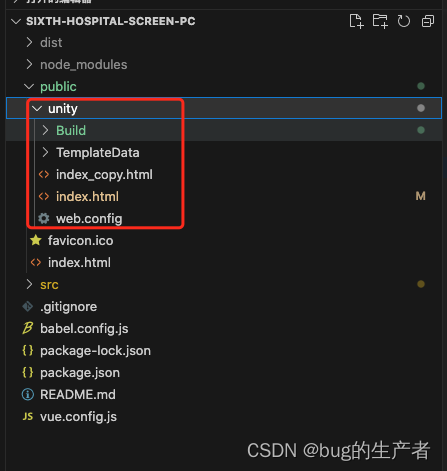
# 2.unity打包之后的index.html文件进行修改
<div id="unity-footer">
      <div id="unity-webgl-logo"></div>
      <div id="unity-fullscreen-button"></div>
      <div id="unity-build-title">Six yuan</div>
    </div>
  </div>
  <script>
    var container = document.querySelector("#unity-container");
    var canvas = document.querySelector("#unity-canvas");
    var loadingBar = document.querySelector("#unity-loading-bar");
    var progressBarFull = document.querySelector("#unity-progress-bar-full");
    var fullscreenButton = document.querySelector("#unity-fullscreen-button");
    var warningBanner = document.querySelector("#unity-warning");

    // Shows a temporary message banner/ribbon for a few seconds, or
    // a permanent error message on top of the canvas if type=='error'.
    // If type=='warning', a yellow highlight color is used.
    // Modify or remove this function to customize the visually presented
    // way that non-critical warnings and error messages are presented to the
    // user.
    function unityShowBanner(msg, type) {
      function updateBannerVisibility() {
        warningBanner.style.display = warningBanner.children.length ? 'block' : 'none';
      }
      var div = document.createElement('div');
      div.innerHTML = msg;
      warningBanner.appendChild(div);
      if (type == 'error') div.style = 'background: red; padding: 10px;';
      else {
        if (type == 'warning') div.style = 'background: yellow; padding: 10px;';
        setTimeout(function () {
          warningBanner.removeChild(div);
          updateBannerVisibility();
        }, 5000);
      }
      updateBannerVisibility();
    }

    var buildUrl = "Build";
    var loaderUrl = buildUrl + "/Sixyuan.loader.js";
    var config = {
      dataUrl: buildUrl + "/Sixyuan.data.unityweb",
      frameworkUrl: buildUrl + "/Sixyuan.framework.js.unityweb",
      codeUrl: buildUrl + "/Sixyuan.wasm.unityweb",
      streamingAssetsUrl: "StreamingAssets",
      companyName: "DefaultCompany",
      productName: "Six yuan",
      productVersion: "0.1",
      showBanner: unityShowBanner,
    };

    // By default Unity keeps WebGL canvas render target size matched with
    // the DOM size of the canvas element (scaled by window.devicePixelRatio)
    // Set this to false if you want to decouple this synchronization from
    // happening inside the engine, and you would instead like to size up
    // the canvas DOM size and WebGL render target sizes yourself.
    // config.matchWebGLToCanvasSize = false;

    if (/iPhone|iPad|iPod|Android/i.test(navigator.userAgent)) {
      container.className = "unity-mobile";
      // Avoid draining fillrate performance on mobile devices,
      // and default/override low DPI mode on mobile browsers.
      config.devicePixelRatio = 1;
      unityShowBanner('WebGL builds are not supported on mobile devices.');
    } else {
      canvas.style.width = "1920px";
      canvas.style.height = "1080px";
    }
    loadingBar.style.display = "block";
    var instance;
    var script = document.createElement("script");
    script.src = loaderUrl;
    script.onload = () => {
      createUnityInstance(canvas, config, (progress) => {
        progressBarFull.style.width = 100 * progress + "%";
      }).then((unityInstance) => {
        instance = unityInstance;
        loadingBar.style.display = "none";
        fullscreenButton.onclick = () => {
          unityInstance.SetFullscreen(1);
        };
      }).catch((message) => {
        alert(message);
      });
    };
    document.body.appendChild(script);
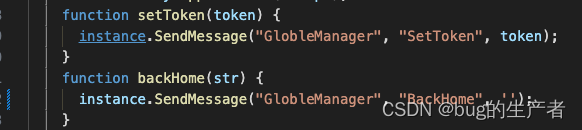
    function setToken(token) {
      instance.SendMessage("GlobleManager", "SetToken", token);
    }
    function backHome(str) {
      instance.SendMessage("GlobleManager", "BackHome", '');
    }
    function unityinit(str) {
      window.parent.postMessage({ switchScene: 1 }, '*'
      )
    }
    function switchScene(str) {
      window.parent.postMessage({ switchScene: 2 }, '*'
      )
    }
  </script>
</body>

</html>
1
2
3
4
5
6
7
8
9
10
11
12
13
14
15
16
17
18
19
20
21
22
23
24
25
26
27
28
29
30
31
32
33
34
35
36
37
38
39
40
41
42
43
44
45
46
47
48
49
50
51
52
53
54
55
56
57
58
59
60
61
62
63
64
65
66
67
68
69
70
71
72
73
74
75
76
77
78
79
80
81
82
83
84
85
86
87
88
89
90
91
92
93
94
95
96
97
98
99
100
101
102
103
104
2
3
4
5
6
7
8
9
10
11
12
13
14
15
16
17
18
19
20
21
22
23
24
25
26
27
28
29
30
31
32
33
34
35
36
37
38
39
40
41
42
43
44
45
46
47
48
49
50
51
52
53
54
55
56
57
58
59
60
61
62
63
64
65
66
67
68
69
70
71
72
73
74
75
76
77
78
79
80
81
82
83
84
85
86
87
88
89
90
91
92
93
94
95
96
97
98
99
100
101
102
103
104
# 3.h5调用u3d的方法(unity里面的index.html文件)
# index.vue文件
<iframe id="iframe" ref="iframe" src="./unity/index.html" frameborder="0" scrolling="no" />
1
# mounted方法
  mounted() {
    this.unityRef = this.$refs.iframe // iframe的dom对象
  },
  this.unityRef.contentWindow.setToken(storageState.token)
  this.unityRef.contentWindow.backHome()
1
2
3
4
5
2
3
4
5
# 4.u3d调用h5方法(unity里面的index.html文件)
    function unityinit(str) {
      window.parent.postMessage({ switchScene: 1 }, '*'
      )
    }
    function switchScene(str) {
      window.parent.postMessage({ switchScene: 2 }, '*'
      )
    }
1
2
3
4
5
6
7
8
2
3
4
5
6
7
8
# mounted里面接收事件
  mounted() {
    window.addEventListener("message", this.recieve)
  },
1
2
3
2
3
# methods方法(根据返回的switchScene的值的不同来调用不同的方法)
    recieve(event) {
      const { data, origin, source } = event
      console.log('unity返回的数据',data)
      if (data.switchScene == 1) {
        this.unitySendMessage()
      } else if (data.switchScene == 2) {
        this.showSon = true
      }
    }
1
2
3
4
5
6
7
8
9
2
3
4
5
6
7
8
9
上次更新: 2023/07/07, 17:17:48