
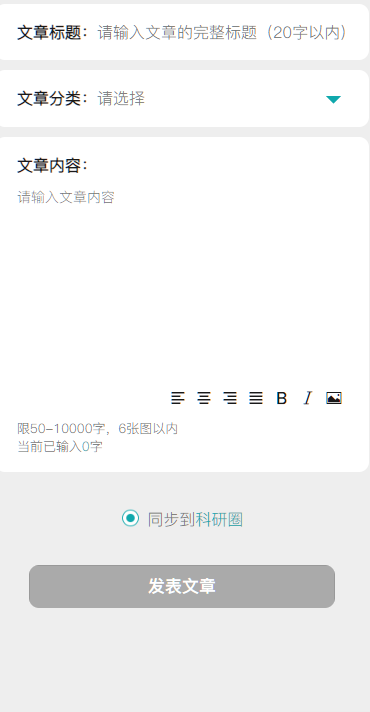
 uniapp富文本组件(只支持H5)
# 效果图
# 属性
- count 类型Number 控制选择图片的数量 (默认 6)
- @uploadFile 选择图片的回调
- this.$refs.KekeEditor.editor_setContents(detail) 设置富文本内容方法 detail为内容
- let detail = await this.$refs.KekeEditor.editor_getcontents() 获取富文本内容方法 detail为获取到的内容(建议使用 async await)
# 使用方法
- 引入
import KekeEditor from "@/components/KekeEditor/KekeEditor.vue"
1
- 注册组件
components: {
	KekeEditor,
},
1
2
3
2
3
- 应用
<KekeEditor ref="KekeEditor" @uploadFile="uploadFile" :count="6"></KekeEditor>
<button @click="get_content">获取内容</button>
<button @click="set_content">设置内容</button>
1
2
3
2
3
data() {
	return {
		detail: "<p>Rboy 设置的内容</p>"
	};
},
methods: {
	// 设置内容
	async set_content() {
		this.$refs.KekeEditor.editor_setContents(this.detail)
	},
	// 获取内容
	async get_content() {
		let detail = await this.$refs.KekeEditor.editor_getcontents()
		console.log(detail)
	},
	// 上传图片
	async uploadFile(event) {
		// event 选择的图片
		for (var item in event.file) {
			// uploadFileApi  为上传到服务端的接口 count大于1 使用 await
			let src = await uploadFileApi(event.file[item])
			// src.url 是服务端返回的图片地址
			// this.$refs.KekeEditor(Object) 方法是往富文本设置图片内容  src 图片地址
			this.$refs.KekeEditor.editor_insertImage({
				src: src.url,
				alt: "混合图",
			})
		}
	},
}
1
2
3
4
5
6
7
8
9
10
11
12
13
14
15
16
17
18
19
20
21
22
23
24
25
26
27
28
29
30
2
3
4
5
6
7
8
9
10
11
12
13
14
15
16
17
18
19
20
21
22
23
24
25
26
27
28
29
30
- 源码(KekeEditor.vue)
<template>
	<div>
		<view class="fu_box">
			<editor id="editor" :show-img-toolbar="true" :show-img-resize="true" :show-img-size="true"
			    @input="getLength"
				:placeholder="placeholder"></editor>
		</view>
		<view class="icons_box">
			<text class="iconfont icon-zuoduiqi" @click="editor_format_btn('align','left')"></text>
			<text class="iconfont icon-juzhongduiqi" @click="editor_format_btn('align','center')"></text>
			<text class="iconfont icon-youduiqi" @click="editor_format_btn('align','right')"></text>
			<text class="iconfont icon-zuoyouduiqi" @click="editor_format_btn('align','justify')">
			</text>
			<text class="iconfont icon-zitijiacu" @click="editor_format_btn('bold')"></text>
			<text class="iconfont icon-zitixieti" @click="editor_format_btn('italic')"></text>
			<text class="iconfont icon-charutupian" @click="$refs.uploadImg.chooseFile()"></text>
			<u-upload
			  ref="uploadImg"
			  style="display: none;"
		      @afterRead="editor_img_btn"
		      name="1"
		      multiple
		      :maxCount="1"
	        ></u-upload>
		</view>
	</div>
</template>

<script>
	export default {
		name: "KekeEditor",
		props: {
			count: {
				type: Number,
				default: 6
			},
			placeholder: {
				type: String,
				default: '请输入...'
			}
		},
		data() {
			return {
				editorCtx: ''
			}
		},
		created() {

		},
		mounted() {
			// #ifdef APP-PLUS || H5 ||MP-WEIXIN
			uni.createSelectorQuery().in(this).select('#editor').context((res2) => {
				this.editorCtx = res2.context
			}).exec()
			// #endif
		},
		methods: {
			// 获取内容
			editor_getcontents() {
				return new Promise((resove, reject) => {
					this.editorCtx.getContents({
						success: (res) => {
							resove(res.html)
						}
					})
				})
			},
			// 设置内容
			editor_setContents(text = "") {
				this.editorCtx.setContents({
					html: text //this.EditGoodsDetail.content为赋值内容。
				})
			},
			// 设置属性
			editor_format_btn(name, value) {
				this.editorCtx.format(name, value)
			},
			// 设置图片
			editor_insertImage(data) {
				if (!data) return false
				this.editorCtx.insertImage(data)
			},
			// 上传图片
			editor_img_btn(e) {
				this.$emit("uploadFile", e.file)
			},
			// 获取内容字数
			getLength(e) {
				if (e.detail.text) {
				  this.$emit('getWordLength', (e.detail.text.length - 1))
				} else {
					this.$emit('getWordLength', 0)
				}
			}
		}
	}
</script>

<style scoped lang="scss">
	@import './editor-icon.css';
	/deep/.ql-editor.ql-blank:before {
	  font-style: normal;
    }
	.icons_box {
		margin-bottom: 15rpx;
		text-align: right;
		.iconfont {
			margin: 5rpx 10rpx;
		}
	}
	.fu_box {
		min-height: 35px !important;
		font-size: 28rpx;
		width: 100%;
		box-sizing: border-box;
		text-align: left;
		color: #333;
		padding: 7px;
		editor {
			width: 100%;
		}
	}

</style>
1
2
3
4
5
6
7
8
9
10
11
12
13
14
15
16
17
18
19
20
21
22
23
24
25
26
27
28
29
30
31
32
33
34
35
36
37
38
39
40
41
42
43
44
45
46
47
48
49
50
51
52
53
54
55
56
57
58
59
60
61
62
63
64
65
66
67
68
69
70
71
72
73
74
75
76
77
78
79
80
81
82
83
84
85
86
87
88
89
90
91
92
93
94
95
96
97
98
99
100
101
102
103
104
105
106
107
108
109
110
111
112
113
114
115
116
117
118
119
120
121
122
123
124
2
3
4
5
6
7
8
9
10
11
12
13
14
15
16
17
18
19
20
21
22
23
24
25
26
27
28
29
30
31
32
33
34
35
36
37
38
39
40
41
42
43
44
45
46
47
48
49
50
51
52
53
54
55
56
57
58
59
60
61
62
63
64
65
66
67
68
69
70
71
72
73
74
75
76
77
78
79
80
81
82
83
84
85
86
87
88
89
90
91
92
93
94
95
96
97
98
99
100
101
102
103
104
105
106
107
108
109
110
111
112
113
114
115
116
117
118
119
120
121
122
123
124
上次更新: 2023/07/07, 17:17:48