
 圆角TabBar
# 效果图
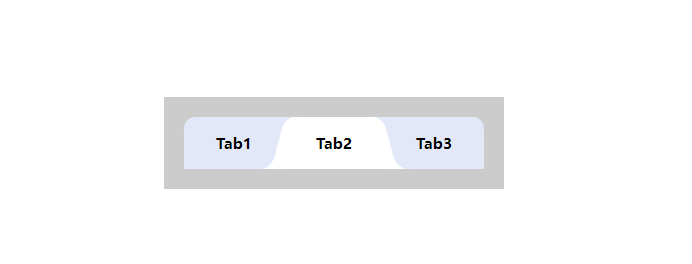
# 组件源码
<script setup>
import { ref } from 'vue';
const tabList = ref([
  {
    id: 1,
    label: 'Tab1'
  },
  {
    id: 2,
    label: 'Tab2'
  },
  {
    id: 3,
    label: 'Tab3'
  }
])
const activeTab = ref(1)
const handleCheckTab = (val) => {
  activeTab.value = val
}
</script>

<template>
  <div class="tab-container">
    <div class="tab-list">
      <div
        v-for="tab in tabList"
        :key="tab.id"
        class="tab-item"
        :class="activeTab === tab.id ? 'tab-selected' : 'not-selected'"
        @click="handleCheckTab(tab.id)"
      >
        <div>{{ tab.label }}</div>
      </div>
    </div>
  </div>
</template>

<style lang="less" scoped>
@tab-height: 52px;
@active-color: #ffffff;
@default-color: #e2e8f8;
@font-color: #000;
.tab-container {
  width: 300px;
  background: #ccc;
  padding: 20px;
  .tab-list {
    display: flex;
    position: relative;
    z-index: 2;
    border-radius: 12px 12px 0 0;
    background-color: @default-color;
    overflow: hidden;

    .tab-item {
      flex: 1;
      height: @tab-height;
      display: flex;
      justify-content: center;
      align-items: center;
      font-size: 15px;
      color: @font-color;
      font-weight: 600;
      cursor: pointer;
      position: relative;
    }
    .tab-selected {
      opacity: 1;
      background: #ffffff;
      border-radius: 12px 12px 0 0;
      box-shadow: 24px 40px 0 @active-color, -24px 40px 0 0 @active-color;
    }
    .tab-selected::before {
      content: '';
      position: absolute;
      left: -6px;
      bottom: 0;
      width: 12px;
      height: @tab-height;
      border-top-left-radius: 12px;
      background-color: @active-color;
      transform: skewX(-15deg);
    }
    .tab-selected::after {
      content: '';
      position: absolute;
      right: -6px;
      bottom: 0;
      width: 12px;
      height: @tab-height;
      border-top-right-radius: 12px;
      background-color: @active-color;
      transform: skewX(15deg);
    }

    .not-selected::before {
      content: '';
      position: absolute;
      left: 6px;
      bottom: 0;
      width: 12px;
      height: @tab-height;
      background: @default-color;
      border-bottom-left-radius: 12px;
      transform: skewX(15deg);
    }
    .not-selected::after {
      content: '';
      position: absolute;
      right: 6px;
      bottom: 0;
      width: 12px;
      z-index: 1;
      height: @tab-height;
      background: @default-color;
      border-bottom-right-radius: 12px;
      transform: skewX(-15deg);
    }
  }
}

</style>
1
2
3
4
5
6
7
8
9
10
11
12
13
14
15
16
17
18
19
20
21
22
23
24
25
26
27
28
29
30
31
32
33
34
35
36
37
38
39
40
41
42
43
44
45
46
47
48
49
50
51
52
53
54
55
56
57
58
59
60
61
62
63
64
65
66
67
68
69
70
71
72
73
74
75
76
77
78
79
80
81
82
83
84
85
86
87
88
89
90
91
92
93
94
95
96
97
98
99
100
101
102
103
104
105
106
107
108
109
110
111
112
113
114
115
116
117
118
119
120
121
122
123
2
3
4
5
6
7
8
9
10
11
12
13
14
15
16
17
18
19
20
21
22
23
24
25
26
27
28
29
30
31
32
33
34
35
36
37
38
39
40
41
42
43
44
45
46
47
48
49
50
51
52
53
54
55
56
57
58
59
60
61
62
63
64
65
66
67
68
69
70
71
72
73
74
75
76
77
78
79
80
81
82
83
84
85
86
87
88
89
90
91
92
93
94
95
96
97
98
99
100
101
102
103
104
105
106
107
108
109
110
111
112
113
114
115
116
117
118
119
120
121
122
123
上次更新: 2023/08/07, 10:37:54