
 H5主题切换
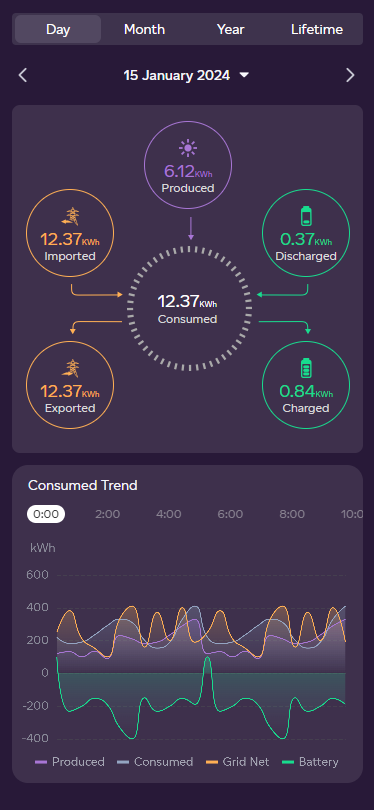
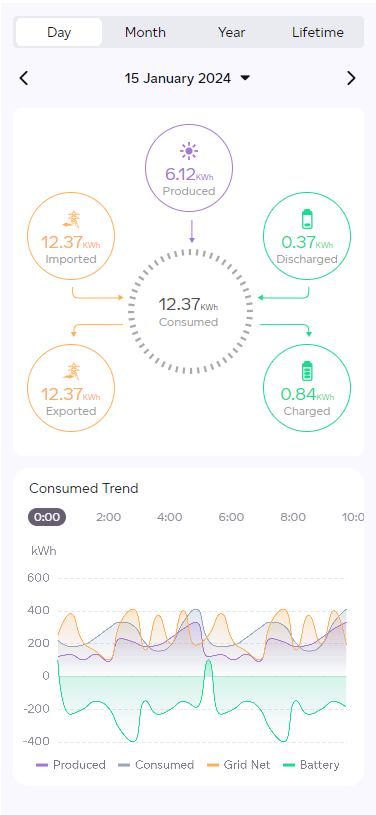
# 效果图
# 功能
- 实现项目中切换不同主题,一般主题分为dark/light两种
- mixin+scss方式
# 实现
theme.scss文件 -> 配置不同的主题配色方案
$themes: (
  dark: (
    main_bg_color: #281938,
    text_color: #DCDCDC,
  ),
  light: (
    main_bg_color: #F8F8FE,
    text_color: #9F9F9F,
  )
)
1
2
3
4
5
6
7
8
9
10
2
3
4
5
6
7
8
9
10
handle.scss文件 -> 操作theme.scss文件中的$theme变量
@import './theme.scss';
@mixin themeify {
  @each $theme-name, $theme-map in $themes {
    // !global把局部变量强升为全局变量
    $theme-map: $theme-map !global;
    [data-theme="#{$theme-name}"] & {
      @content;
    }
  }
}

@function themed($key) {
  @return map-get($theme-map, $key);
}

// 背景颜色
@mixin set_bg($color) {
  @include themeify {
    background: themed($color);
  }
}

// 字体颜色
@mixin set_color($color) {
  @include themeify {
    color: themed($color);
  }
}
...
1
2
3
4
5
6
7
8
9
10
11
12
13
14
15
16
17
18
19
20
21
22
23
24
25
26
27
28
29
2
3
4
5
6
7
8
9
10
11
12
13
14
15
16
17
18
19
20
21
22
23
24
25
26
27
28
29
index.vue -> 具体的页面文件中
@import "@/styles/handle.scss";
.page-wrapper {
  @include set_bg('main_bg_color');
  .title {
    @include set_color('text_color');
  }
}
1
2
3
4
5
6
7
2
3
4
5
6
7
样式文件配置完成后,我们需要传入当前想要使用的主题,此操作可以放到入口文件App.vue中
import { useMainStore } from "@/store/index";
const store = useMainStore();

onMounted(() => {
  let mode = 'dark';
  window.document.documentElement.setAttribute('data-theme', mode);  // mode需替换成动态的主题变量
  store.changeMode(mode);
})
1
2
3
4
5
6
7
8
2
3
4
5
6
7
8
针对图片、图表这类,无法直接使用css样式进行主题的切换,所以需要将主题变量存入vuex或者localStorage中,在具体页面中通过监听此变量,配置不同的图片或者图表文字颜色等 这里使用的vuex存主题数据(store.js)
import { defineStore } from 'pinia'

export const useMainStore = defineStore({
  id: 'main',
  state: () => {
    return {
      mode: 'dark' // 默认
    }
  },
  getters: {},
  actions: {
    changeMode(state) {
      this.mode = state;
    }
  }
})
1
2
3
4
5
6
7
8
9
10
11
12
13
14
15
16
2
3
4
5
6
7
8
9
10
11
12
13
14
15
16
页面文件(index.vue)
<template>
  <div class="page-wrapper">
    <!-- 图片命名对应的主题模式 -->
    <img v-if="mode" :src="importUrl(`images/icons/caret-down-${mode}.png`)" />
  </div>
</template>
<script setup>
import { ref, computed } from 'vue';
import { useMainStore } from '@/store/index';

// 获取主题
const store = useMainStore();
const mode = computed(() => (
  store.mode
));

// 图表中字体颜色
const textColor = ref(mode === 'dark' ? '#fff' : '#000');
</script>
1
2
3
4
5
6
7
8
9
10
11
12
13
14
15
16
17
18
19
2
3
4
5
6
7
8
9
10
11
12
13
14
15
16
17
18
19
上次更新: 2024/01/15, 14:16:28